Откуцај
СРENРУ Log in

Desktop edition · Windows · approval pending

Otkucaj for your PC: fiscalization with or without internet, on the Tax Administration's card

Otkucaj LPFR is a local fiscal receipt processor for Windows with a built-in till. It keeps the Tax Administration's security element (a smart card) in a reader on your own computer, signs receipts even when the internet is down, and delivers the data to the Tax Administration by itself as soon as there is a connection. Free, like everything in Otkucaj.

Version 1.0 · 44 MB · Windows 10 and 11, 64-bit · SHA-256 checksum

  • Signs receipts without internet
  • Built-in till, prints on 58 and 80 mm rolls
  • Audit by itself, over the internet or on USB
  • L-PFR: application 1659, approval pending
  • Built-in till: approved ESIR, record no. 1666

The Otkucaj web till (approved ESIR, record no. 1667) is a separate product and keeps working as before: home page.

Otkucaj Kasa · 127.0.0.1:8888 TEST
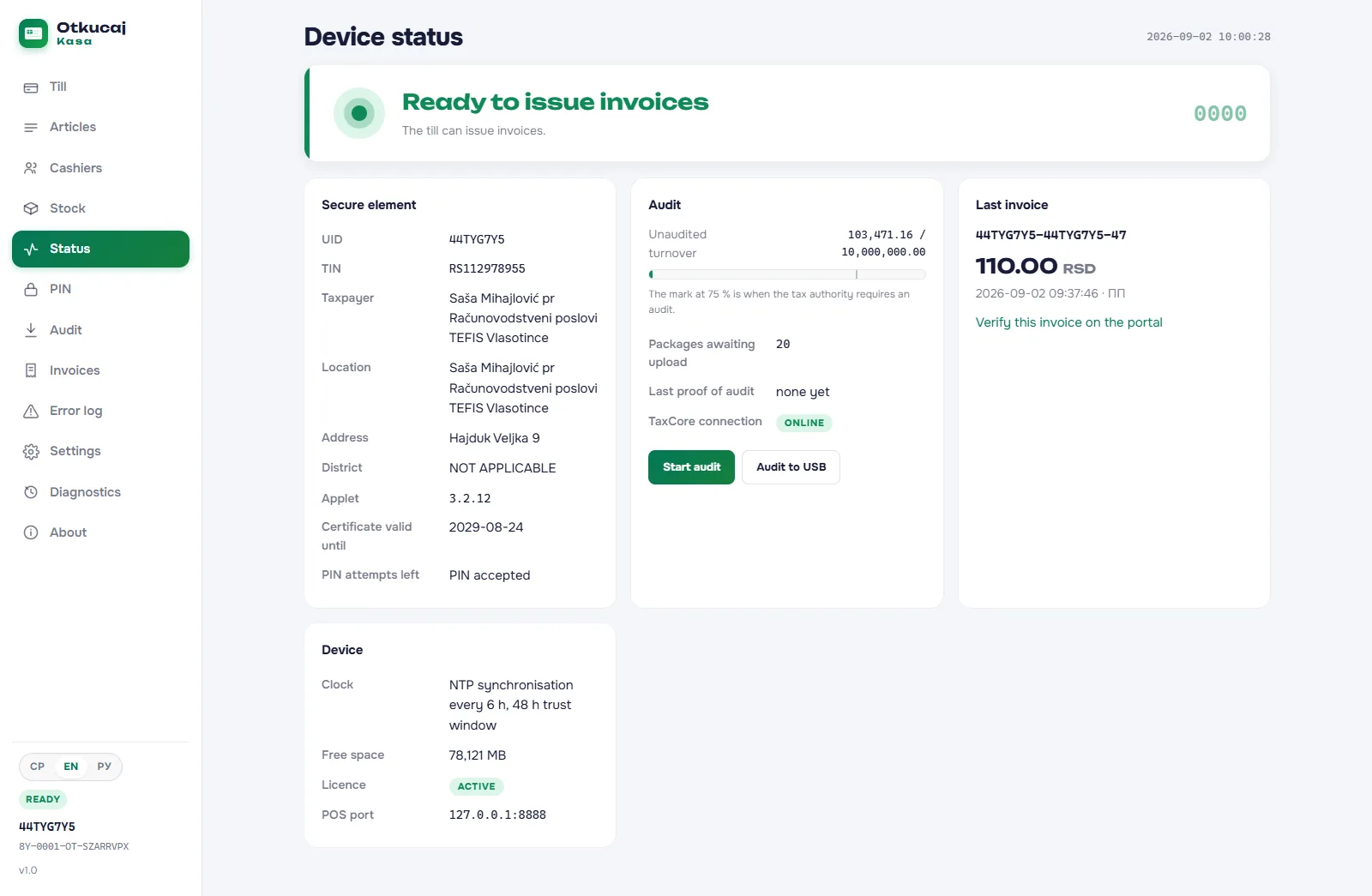
The Otkucaj application window on a PC: the Status screen with the card in the reader, the state Ready for receipts, the last receipt and the audit state
The application window on Windows, in the Tax Administration's test environment: card in the reader, PIN entered, device ready for receipts, audit running in the background.
Approval status Otkucaj LPFR has been filed with the Tax Administration of the Republic of Serbia under number 1659 (version 1.0) and is in technical review. Until the decision it is not an approved element of electronic fiscalization: it runs in the Tax Administration's test environment with a test card, and receipts issued there have no fiscal validity. The built-in till, Otkucaj Kasa 1.0, is filed as an ESIR in a separate application and was approved by the Tax Administration on 8 September 2026, record number 1666. The Otkucaj web till (record no. 1667) is approved independently of this.

01 How it works

Install, insert the card, enter the PIN

By law the L-PFR is the part of a fiscal device that signs the receipt and keeps the data until it is audited. Otkucaj ships it as an ordinary Windows program: no dedicated device, no subscription, no server.

  1. 01

    Install the program

    Download the installer, run it as administrator, and two minutes later you have a Windows service running in the background and an application window in the Start menu and the notification area.

  2. 02

    Insert the card and enter the PIN

    The security element is a smart card the Tax Administration issues for your business premises. Put it in a USB reader, enter the PIN in the application window, and the device reads the TIN, name and address off the card and fetches the tax rates from the Tax Administration.

  3. 03

    Issue receipts

    From the built-in till on the same PC, or from any ESIR that speaks the Tax Administration's standard protocol on port 8888. Every receipt is signed by the card on the spot and its audit package is written to disk immediately.

02 Features

A shop has to keep working when the internet does not

Everything else follows from that one sentence. Every item below exists in version 1.0.

Works without internet

The receipt is signed by the card in the reader, not by a service on the network. No network call is a precondition for issuing a receipt: sales continue when the connection drops for an hour, a day or a week, and the audit packages accumulate on disk.

Internet audit by itself

As soon as a connection exists the device signs in to the Tax Administration's service, sends every unsent package (oldest first), fetches commands and the proof of audit and applies it to the card. None of it needs a click.

Local audit on USB

Plug in a USB stick and the device executes the commands on it, writes the packages into a folder named after the card and requests a proof of audit. It works with the card out of the reader and with no internet for days.

Built-in till

Items with a price and a tax label, cashiers with permissions, stock that goes down with every receipt, refunds, advances, buyer identification and a list of issued receipts with a QR code for verification.

Thermal printing

ESC/POS printers on 58 and 80 mm rolls, with a 40 to 50 mm QR code inside the receipt frame. The receipt is always printed exactly as the card signed it.

Open to other tills

The Tax Administration's standard protocol (TaxCore API v3) on port 8888, the same as a V-PFR. A till that already works with some L-PFR works with this one; by default it listens only on the PC itself and opens to the local network by a setting.

Nothing is typed in by hand

The TIN, the taxpayer's name, the point of sale, the address and the district are read off the card. Tax rates, the verification address and the time server arrive as commands from the Tax Administration. There is no field where anyone could type them.

Clock and error log

Time is synchronised with the Tax Administration's server and cannot run backwards: a new receipt never carries a time earlier than the previous one. Every error is logged chronologically and exported as text, from the application or onto a USB stick.

Three languages, one receipt

The interface is in Serbian (Cyrillic), English and Russian, chosen in the window. The receipt stays in Serbian or English, as the Tax Administration supports: the interface language never changes the fiscal document.

03 Technical data

What you need

An ordinary Windows PC, the one your till already runs on, a USB smart card reader and the security element the Tax Administration issues for your business premises. A reader costs around 1,200 dinars; the card is requested on the Tax Administration's portal for your own TIN and premises.

The device is not hosted and cannot be: the card must physically sit in the reader of the PC the program runs on. That is why an L-PFR can never be a web service, ours or anyone else's.

Operating system
Windows 10 and 11, 64-bit
Card reader
USB CCID (e.g. Gemalto)
Security element
Tax Administration smart card
Protocol to the till
TaxCore API v3, HTTP, port 8888
Disk space
1 GB for about 40,000 receipts
Printers
ESC/POS, 58 and 80 mm rolls
Interface languages
Serbian, English, Russian
Version
1.0
Price
free

04 Installation

Download and verify

The installer is not signed with a code-signing certificate, so Windows SmartScreen shows a warning. Instead of a signature, check the file's checksum: it changes if a single byte changes.

Otkucaj-LPFR-Setup-1.0.exe

44 MB, Windows 10 and 11, 64-bit. After downloading, compare the SHA-256 checksum on the command line:

certutil -hashfile Otkucaj-LPFR-Setup-1.0.exe SHA256

0da0b4a121f9a97141e3bf300af969bb6548be35f009c1283bf4fdb89bccc678

Download the installer ›

Guided installation

Run the installer as administrator. The program goes to C:\Program Files\Otkucaj LPFR, the data to C:\ProgramData\Otkucaj LPFR, and the service registers itself and starts on its own after every reboot. For many PCs there is a silent install: /VERYSILENT.

Data is never deleted

Uninstalling never touches the data folder: audit packages may only be removed by a proof of audit issued by the Tax Administration.

05 Two editions

Web till or desktop edition?

Same maker, two products, two applications with the Tax Administration. You choose by how reliable your internet connection is and whether you want the card on the premises.

Desktop edition (L-PFR + till) Web till otkucaj.com (ESIR, record no. 1667)
Where it runs On your Windows PC, as a service In a browser, on a PC, tablet or phone
Who signs the receipt The Tax Administration's card in your reader The Tax Administration's V-PFR over the internet, or an L-PFR on your local network
Without internet Issues fiscal receipts and delivers them later Receipts wait in a queue until the connection returns (with a V-PFR)
Status with the Tax Administration L-PFR: application 1659, approval pending. Built-in till: approved ESIR, record no. 1666 Approved ESIR, record number 1667
Price Free Free up to 500 receipts a month

06 Questions and answers

Before you download

Can I already issue fiscal receipts with this?

Not yet. Otkucaj LPFR has been filed with the Tax Administration under number 1659 and is in technical review. Until the decision it runs in the Tax Administration's test environment with a test card, and receipts issued there have no fiscal validity. As soon as the decision arrives, this page will show the record number, and the same program will issue real receipts with a production card. The built-in till, Otkucaj Kasa 1.0, has been an approved ESIR since 8 September 2026 (record no. 1666); real receipts still need an approved PFR, and our L-PFR is waiting for its decision.

What equipment do I need?

A Windows PC (10 or 11, 64-bit), a USB smart card reader and the security element in the form of a smart card, which the Tax Administration issues for your TIN and business premises. You request the card on the Tax Administration's portal; a test card for the test environment, a production card for real trade. A printer is only needed if you want a paper receipt from the built-in till.

How much does it cost?

Nothing. The installation, updates and the built-in till are free, as is the Otkucaj web till. Only priority support is paid, if you ever need it, on the same terms as for the web till.

What happens when there is no internet?

Sales go on as usual: the card signs the receipt locally and the audit package is written to disk. When the connection returns, the device sends everything that is waiting by itself. If there is no connection for days, you hand the data to the Tax Administration on a USB stick: plug it in and the device performs the local audit on its own.

The only limit is set by the card itself: it has a limit of unaudited receipts decided by the Tax Administration, after which it asks for a proof of audit, over the internet or over USB.

Does it run on Linux or on a Mac?

Otkucaj LPFR 1.0 runs on Windows 10 and 11, 64-bit. There is no Linux or macOS edition.

Can I use my own till instead of the built-in one?

Yes. The device speaks the Tax Administration's standard protocol on port 8888, the same as a V-PFR, so any till that can work with an L-PFR works with this one. On the same PC the till connects to http://127.0.0.1:8888; for tills on other PCs on the premises, enable listening on the local network (installation guide, chapter 6.2).

Where is my data and who can delete it?

On your PC, in the folder C:\ProgramData\Otkucaj LPFR. Audit packages are deleted neither by uninstalling nor by us: only a proof of audit issued by the Tax Administration, after it has received the data, removes them. You back up by copying that folder while the service is stopped.

A till that works without internet too

Download the desktop edition, try it with the Tax Administration's test card and be ready for the day the decision arrives. The Otkucaj web till keeps working for you regardless.

Questions? Write to us